



How to Build an Online Check-in Flow Guests Actually Complete
 By Duve Team
By Duve Team
By Duve Team Stay updated on the latest Guest Experience and Hospitality Tech updates.
Online check-in exists to replace the front desk line with something a guest finishes before they arrive. When the flow is configured well, that’s exactly what happens: guests handle their personal details, payment, e-signature, and even room upgrades from their phone, and properties running it well see completion rates approaching 80%, guests finishing everything before they reach the door.
Getting there comes down to knowing exactly where guests drop off along the way and building the flow around it. We looked at check-in activity across the Duve platform to map that out: the screens, timing, and channels that decide whether a guest finishes what they started. Here’s what the data shows, and how to build each part of the flow around it.
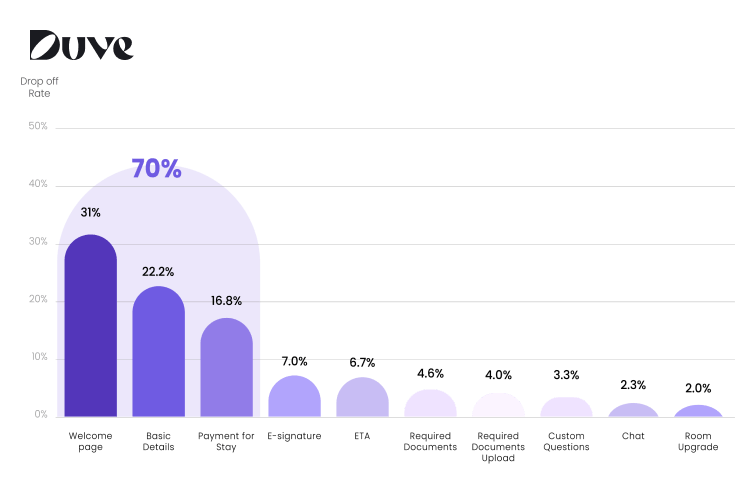
Data across the platform indicates the Welcome page carries the most weight of any single screen, roughly 31% of all drop-off happens here alone, before a guest has typed anything. Avoid that by treating the Welcome page as the moment that earns the rest of the flow: the reservation preview needs to be immediately recognizable (their name, their dates, their property), the branding needs to look like it came from the hotel and not a generic form, and the call to action needs to be obvious. A guest should recognize their own booking in under two seconds.
Add the next screen, Basic Details, and just over half of all drop-off happens within the first two steps combined. Most of what this screen asks for is information the property already has from the booking. Avoid losing guests here by pre-filling what the PMS already knows and asking only for what’s genuinely missing. For returning guests or narrow use cases, Quick Action Mode is worth using too: send guests straight to the one step they actually need, just document upload, just signing, instead of routing everyone through the full sequence from the top.
By the third screen, Payment for Stay, cumulative drop-off reaches close to 70%. Avoid that by making sure guests only see the payment step when it applies to them. A guest who already paid in full through an OTA has no reason to see a payment screen, and skipping it for them is one of the simplest ways to raise completion: configure the flow by booking source so payment, ID upload, and other steps only appear for guests who actually need them.
Here’s some good news: the steps hotels tend to worry about most, ID upload and e-signature, aren’t where the flow loses the most guests. By the time someone reaches those steps, they’ve already cleared the three screens that account for most of the drop-off. Get the Welcome page, Basic Details, and Payment right first. That’s where the completion rate is won or lost.
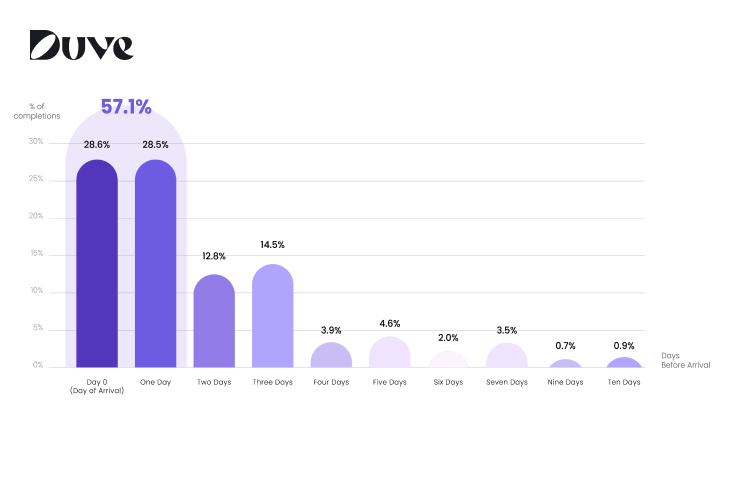
Even with the process fully online, 57% of guests who complete check-in do it within 24 hours of arrival, split almost evenly between the day of arrival and the day before. That’s not a gap to close, it’s a pattern to design around. A reminder schedule that front-loads messages early (a booking confirmation, then a nudge a week out) and tapers off close to arrival is pulling back right when most guests are ready to act. A well-timed reminder inside that final 24-hour window will consistently outperform an earlier one that arrives before the guest is paying attention.
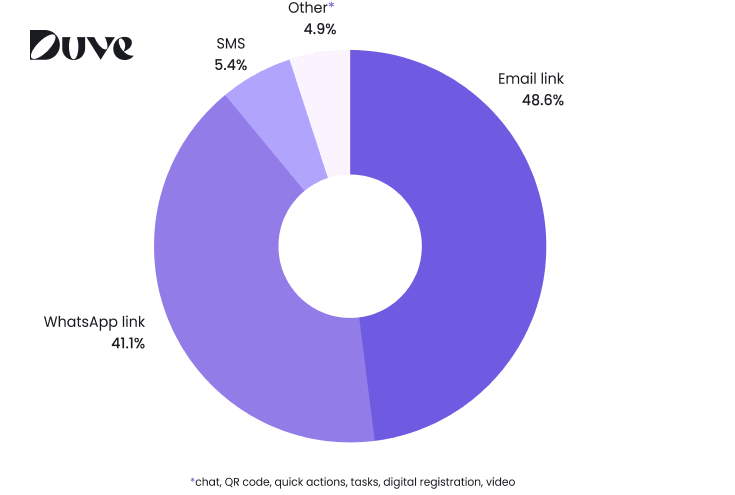
When guests enter the check-in flow, 48.6% arrive through an emailed link, 41.1% through WhatsApp, and just 5.4% through SMS. Email edges out WhatsApp, but not by enough to treat either one as the default. Avoid losing guests before they even reach the Welcome page by sending the invitation on both channels rather than picking one. With a split this close, an email-only or WhatsApp-only sequence is likely reaching only half its potential audience.
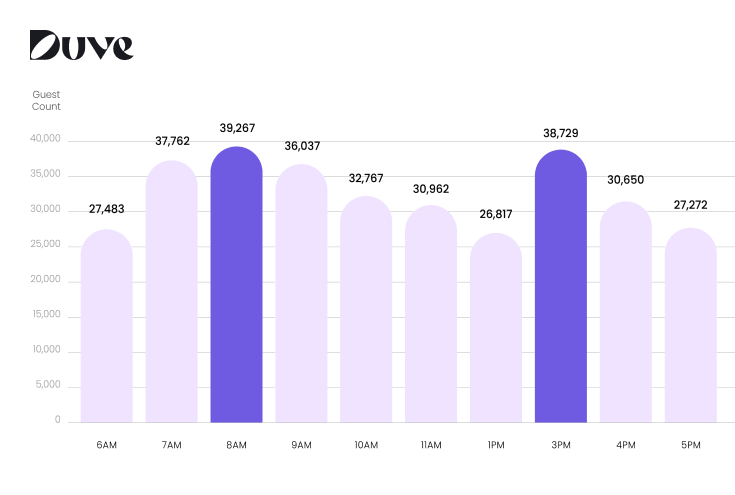
There’s a staffing angle worth building in too. Check-in activity clusters into two windows, roughly 7 to 10am and again around 3pm UTC. Reviewing submissions only once a day, in the morning, means missing the entire afternoon batch.
Every one of these fixes is something a property controls: screen order, which fields to ask for, which channel to send on, when to remind. None of it depends on convincing guests to behave differently. Properties that treat online check-in as something to keep tuning, rather than something turned on once and left alone, are the ones getting closest to that 80% ceiling.
Duve’s Online Check-in gives properties control over every part of that flow: which steps appear, in what order, through which channel, and for which guests. Book a demo to see how it’s configured for properties running completion rates near the top of that range.